

Schedule when a campaign runs
Set the days and hours a campaign is allowed to act.
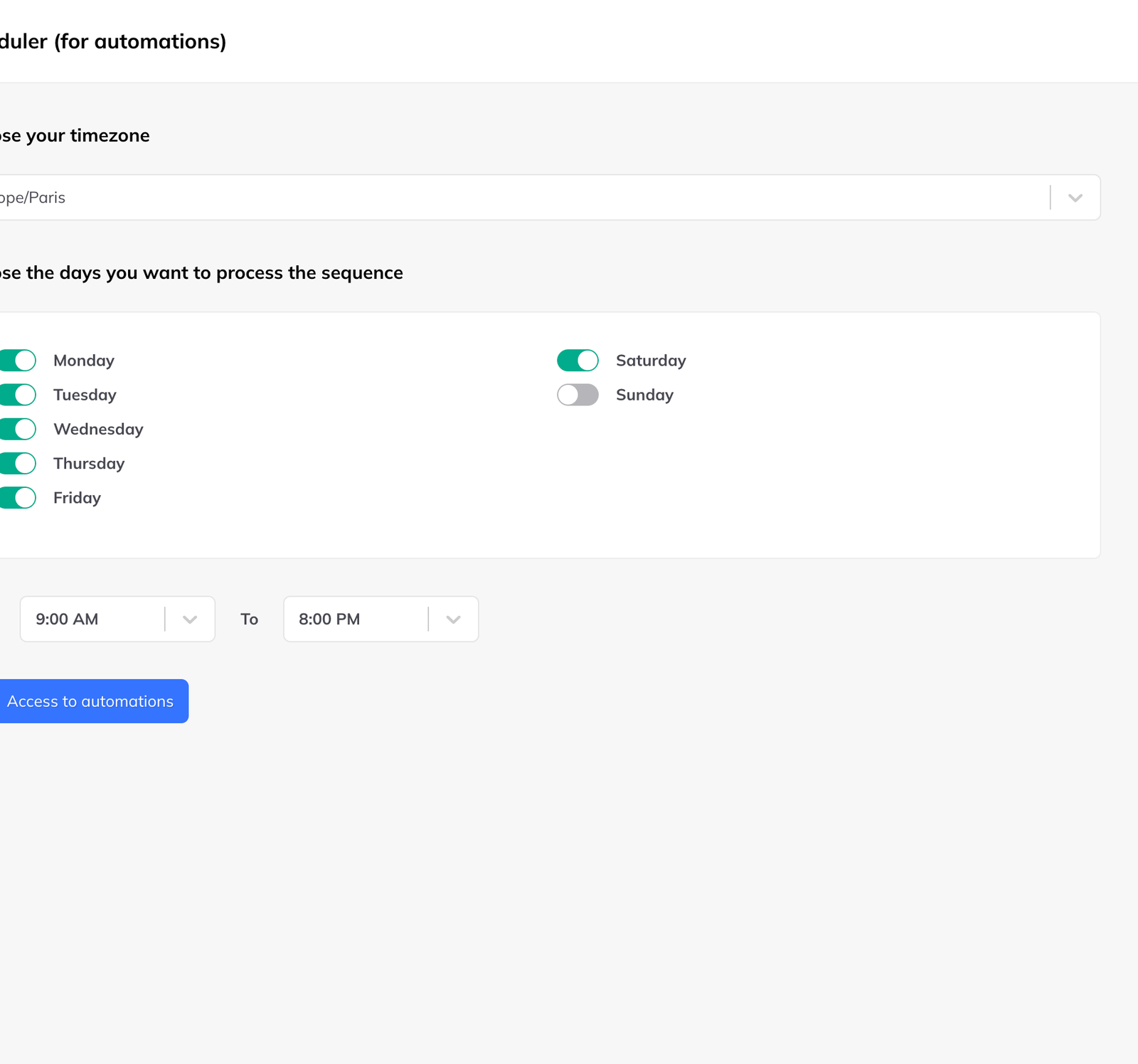
Campaigns only act during hours you have said are yours. You set those once, in Settings → Scheduling.
What to set
- Your time zone
- The days of the week campaigns may run
- The hours within those days — 9am to 6pm, say
Why it matters
LinkedIn watches activity patterns as much as volume. An account that sends messages at three in the morning, or works steadily through Sunday, does not look like a person with a job.
Set the window to match when you actually use LinkedIn. If you do not work weekends, the campaign should not either.
How it uses the window
Within your days and hours, actions are planned daily around your limits and how far each lead has got. The work is spread across the window rather than fired at the start of it.
Three campaigns at a time
At most three campaigns run simultaneously. Launch a fourth and it is queued automatically, starting as soon as one of the three finishes.
When a task fails
Campaign tasks run in the cloud, so they continue when your browser is closed and your computer is off.
- A LinkedLeads-side error — a temporary connection problem — is rescheduled automatically.
- A LinkedIn-side error — a deleted, blocked or invalid profile — is discarded and not retried, because retrying it would fail identically.